
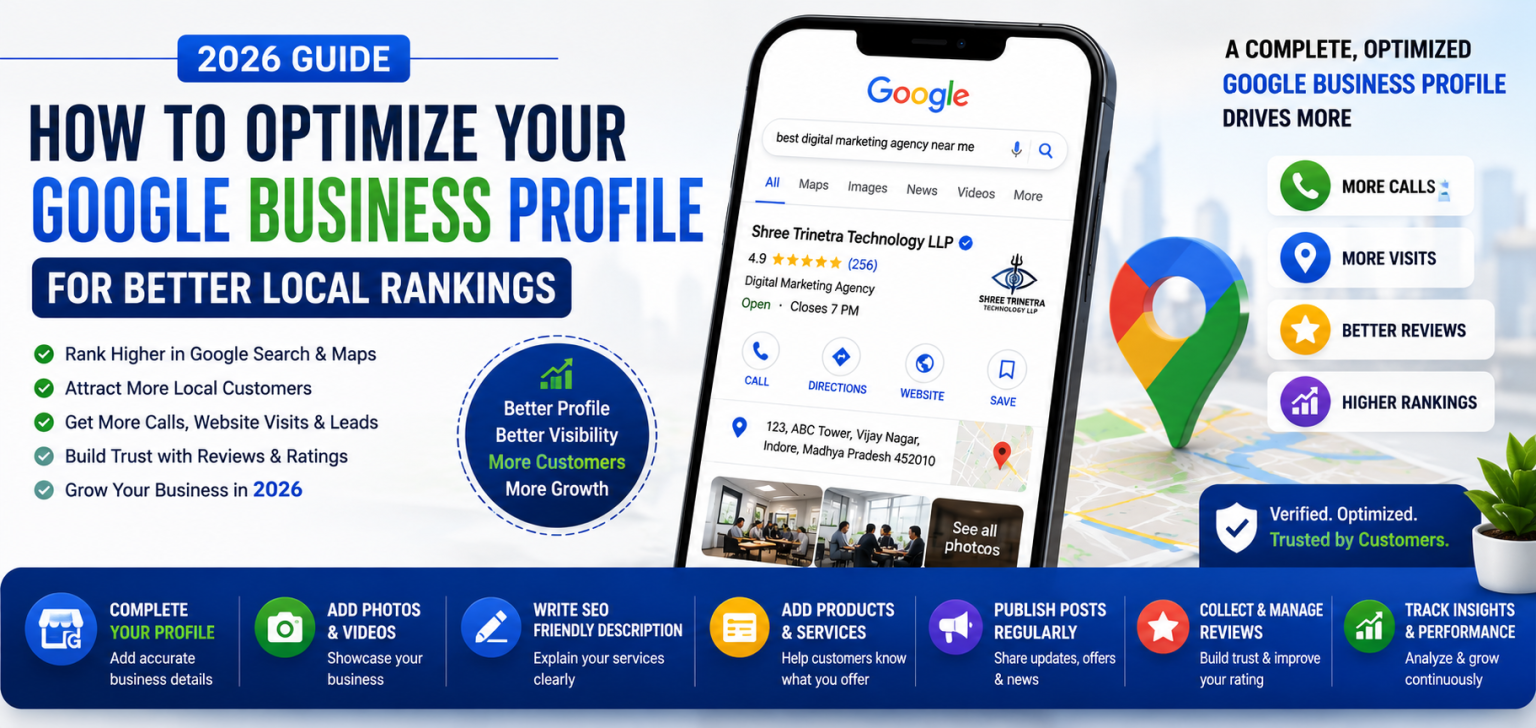
Imagine a potential customer searching for "best digital marketing agency near me", "website development company in Bhopal", or "IT company near me". Before they even visit a website, Google often displays a list of local businesses with ratings, reviews, business hours, phone numbers, photos, and directions.
If your business appears in these local results, you're far more likely to receive calls, website visits, and inquiries. If it doesn't, your competitors may be getting customers who could have chosen your business instead.
One of the biggest reasons businesses fail to rank locally is an incomplete or poorly optimized Google Business Profile (GBP). Simply creating a profile isn't enough. To improve visibility and attract more customers, every section of your profile needs to be optimized strategically.
At Shree Trinetra Technology LLP, we help businesses strengthen their local presence through Google Business Profile optimization, Local SEO, and conversion-focused digital marketing strategies. A properly managed GBP can become one of your most valuable lead-generation assets.
In this guide, we'll explain how to optimize your Google Business Profile step by step so you can improve your local rankings, build trust, and attract more customers in 2026.
Google Business Profile (formerly Google My Business) is a free business listing provided by Google. It allows businesses to display important information directly in Google Search and Google Maps, making it easier for customers to discover, contact, and visit them.
Your profile can include your business name, address, phone number, website, operating hours, services, products, customer reviews, photos, videos, and much more.
A complete and regularly updated profile sends strong trust signals to both customers and Google, increasing your chances of appearing in local search results.
Google Business Profile is one of the most influential ranking factors in Local SEO. When users search for businesses near their location, Google uses profile information along with website quality, customer reviews, and relevance to determine which businesses appear in local search results.
A well-optimized profile increases your chances of appearing in Google's Local Pack, Google Maps, and location-based searches, helping you connect with customers who are actively looking for your services.
The first step is to claim ownership of your Google Business Profile. If your business already appears on Google, claim the listing and complete Google's verification process. Verification confirms that you are the legitimate owner and allows you to manage your profile.
Depending on your business type and location, Google may verify your profile through a postcard, phone call, email, video verification, or other approved methods.
Without verification, you cannot fully manage your business information or access important optimization features.
Many businesses leave important sections incomplete, reducing their chances of ranking well. Every available field should be filled accurately because complete profiles provide a better experience for customers and stronger signals for Google's algorithm.
Your primary category tells Google what your business does and has a significant impact on local rankings. Select the category that best represents your core service, then add relevant secondary categories to cover additional offerings.
For example, a company offering website development and digital marketing should choose the most relevant primary category while adding related categories only when they accurately reflect the business.
Visual content plays an important role in customer decision-making. Businesses with professional photos often receive more profile views and customer interactions than those with few or outdated images.
Upload clear images of your office, team, products, services, completed projects, and branding. Regularly adding fresh photos also signals that your business is active and well-maintained.
Your business description is an opportunity to tell both customers and Google what your company offers. Instead of stuffing keywords, write a clear and natural description that explains your services, expertise, and the value you provide.
Include your primary services, target locations, and what makes your business unique. A well-written description improves customer understanding while supporting your overall Local SEO strategy.
Google Business Profile allows businesses to list their products and services individually. This helps customers understand exactly what you offer and provides Google with additional context about your business.
Each service should include a descriptive title, a concise explanation, and, where appropriate, pricing information. This not only enhances user experience but also improves the relevance of your profile in local searches.
Google Posts allow you to share updates, promotions, new services, company news, events, and blog articles directly through your Business Profile. Regular posting demonstrates that your business is active and engaged.
Aim to publish fresh content consistently. Posts featuring helpful information, seasonal offers, or new product launches encourage customer interaction and can improve profile engagement.
Customer reviews are one of the strongest trust signals in Local SEO. Businesses with authentic, positive reviews often receive higher engagement and greater credibility in Google's local search results.
Encourage satisfied customers to leave honest feedback and make it a habit to respond professionally to every review. Thank customers for positive comments and address negative feedback respectfully and constructively.
If available in your region, enable messaging so potential customers can contact you directly from your Business Profile. Responding quickly to inquiries helps build trust and increases the likelihood of converting prospects into customers.
Similarly, monitor the Questions & Answers section. Providing accurate responses to common questions reduces customer uncertainty and demonstrates that your business is responsive and reliable.
Google Business Profile includes an Insights section that provides valuable information about how customers discover and interact with your listing.
Regularly reviewing these metrics helps you understand which optimization efforts are working and where improvements are needed.
Even small mistakes can reduce your visibility in local search results. Regular maintenance ensures your profile remains accurate, trustworthy, and competitive.
Optimizing your Google Business Profile is one of the simplest yet most effective ways to improve your local online visibility. A complete, accurate, and actively managed profile helps customers find your business more easily while increasing trust and engagement.
At Shree Trinetra Technology LLP, we help businesses maximize their local presence through Google Business Profile optimization, Local SEO, website development, and digital marketing strategies tailored to long-term growth. By consistently updating your profile, encouraging customer reviews, and providing accurate business information, you can strengthen your position in Google Search and Google Maps.
As local competition continues to increase in 2026, businesses that actively manage and optimize their Google Business Profile will be better positioned to attract nearby customers, generate more leads, and build lasting credibility within their communities.
Whether you need a website, eCommerce store, SEO, or digital marketing, our experts are here to help you achieve your goals.
Get Free Consultation

Comments (0)
No comments yet